FlatSpec helps turn scattered supplier documents and webpage tables into a local project deck. On October 8, 2026, we tested version 1.0.0.0 on two public manufacturer websites: Swagelok for industrial fittings and Henry for building-envelope documents. The demo verified document discovery, downloads, Excel export, and a product comparison—and showed where automatic document extraction still needs improvement.
This is a first-party FlatAEC product update. Swagelok and Henry are demonstration sources, not partners or endorsers.
Why these two websites fit FlatSpec
Swagelok combines precise part numbers, webpage specification tables, and supporting PDF catalogs. It is useful for sourcing teams comparing nearly identical industrial components. Henry groups product data, installation manuals, architectural details, and guide specifications around a building product. It is useful for architects, engineers, contractors, and distributors assembling a submittal or product evidence folder.
Swagelok: compare two fittings without retyping the specifications
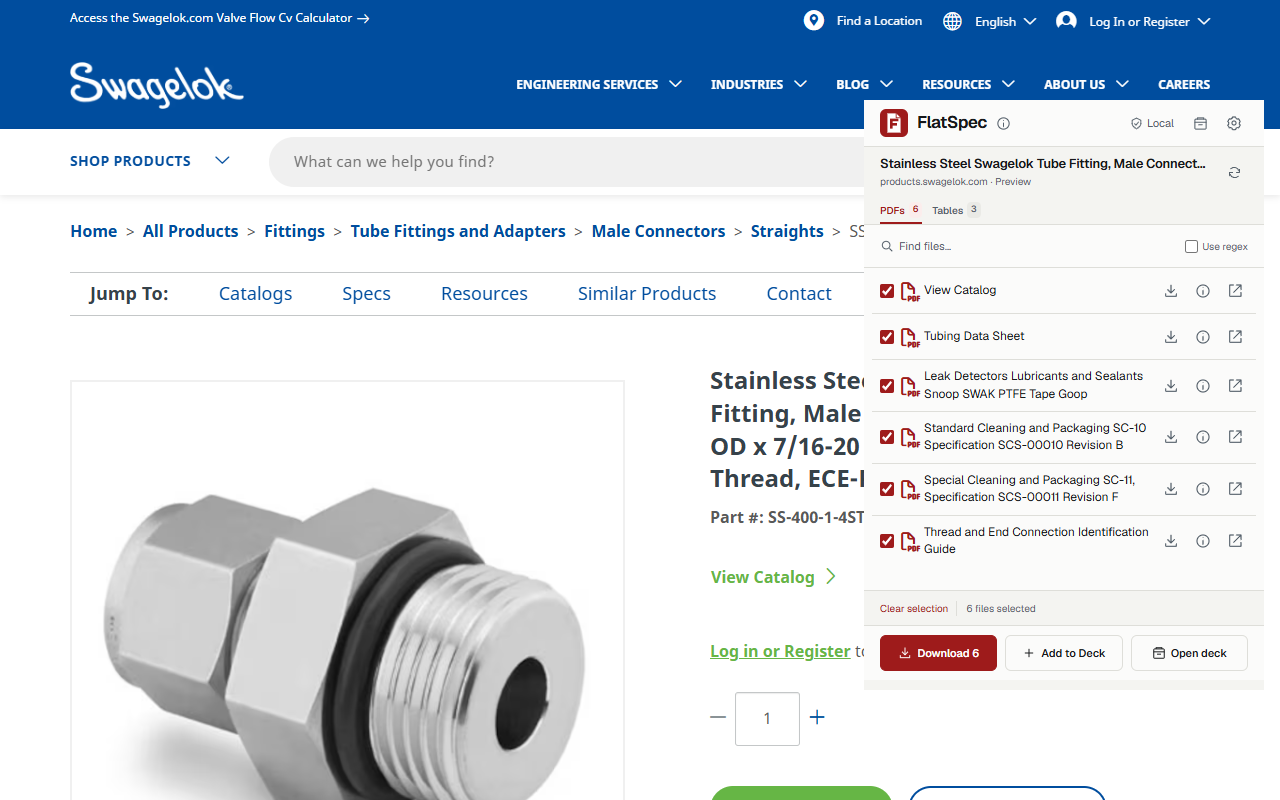
We opened SS-400-1-4STDE and SS-400-1-4. FlatSpec detected six PDFs and three tables on each page. We saved the captured resources into separate product groups and exported a captured table to XLSX. The exported workbook contained the source’s 316 stainless steel value.
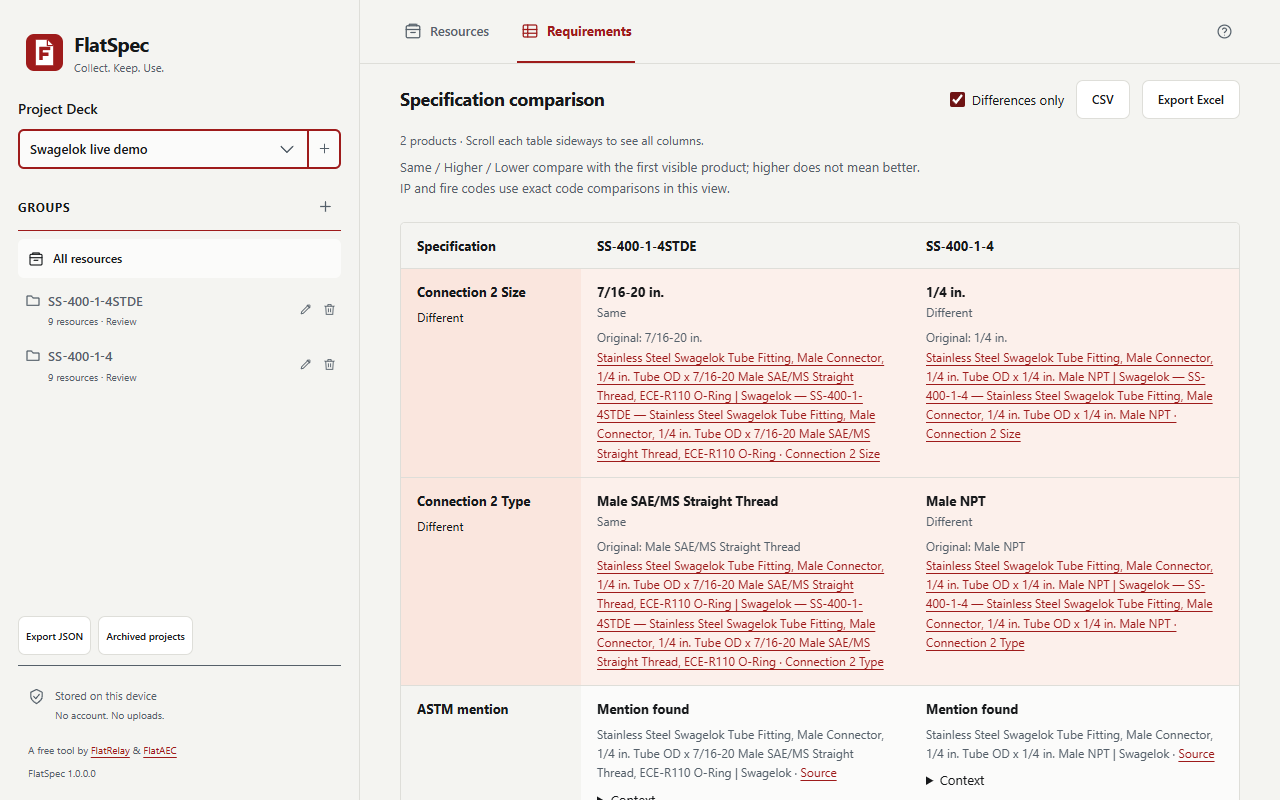
We then manually assigned each saved specification table to its part number and compared the two records. FlatSpec highlighted 2 differing property rows:
| Property | SS-400-1-4STDE | SS-400-1-4 |
|---|---|---|
| Connection 2 size | 7/16-20 in. | 1/4 in. |
| Connection 2 type | Male SAE/MS Straight Thread | Male NPT |
The differences came from captured webpage tables, with source references retained. This comparison used the extension’s manual saved-table assignment workflow; it was not automatic PDF extraction or an engineering suitability determination.
Henry: collect an AEC product’s technical documents
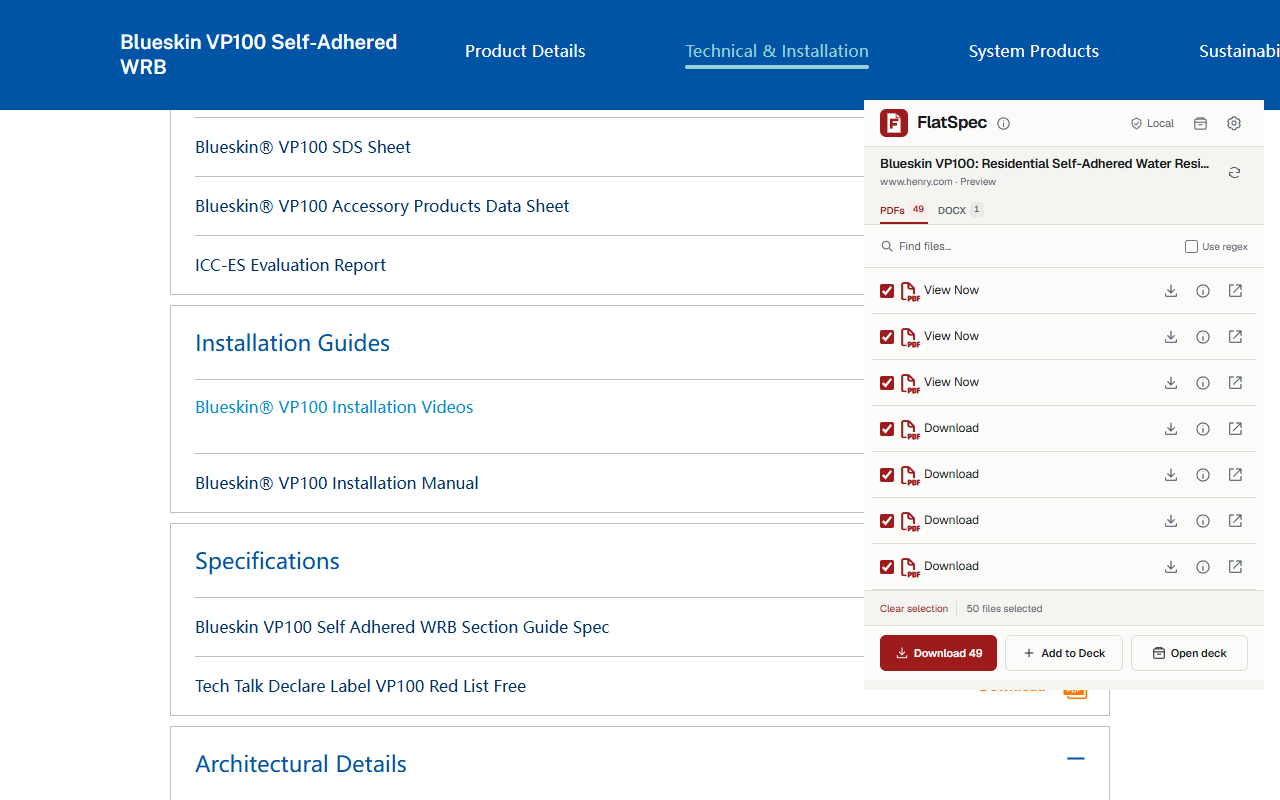
We opened the Blueskin VP100 product page, selected Technical & Installation, and expanded Data Sheets, Installation Guides, Specifications, and Architectural Details. FlatSpec then detected 49 PDFs and 1 DOCX guide specification, with no capturable webpage tables in this scan.
This step matters: FlatSpec scans exposed page content. Open relevant tabs and collapsed document sections first, then refresh the popup. The resulting collection includes visible literature and technical documents; the count is not a claim that every file is product-specific or that every document on the entire website was discovered.
We saved the discovered resources into a Blueskin VP100 group, downloaded its product data PDF and Word guide specification, and verified the downloaded files as PDF and DOCX containers. Each resource retained its original file URL and source page reference.
What the document analysis did—and did not—extract
We imported the downloaded Swagelok Tubing Data Sheet PDF and Henry product data PDF and DOCX guide specification into Requirements. The local analyzer completed these imports. It found no product records meeting the current strict identity-and-attribute binding rules in these documents. Their documents were retained; unbound technical text was skipped instead of assigned by guesswork.
That is a real limitation of this release. Downloading and organizing a document does not mean its prose can automatically become a reliable comparison. A clearly labeled webpage table can still be captured, exported, and manually bound to a product, as the Swagelok example demonstrates. Scanned documents need OCR, and these tests do not establish extraction coverage across other manufacturer documents.
Reproduce the demo
- Open either linked product page with FlatSpec loaded in Chrome.
- Expand the website’s relevant document sections, then open or refresh FlatSpec.
- Select files and save them to a Project → Group, or download the selected files.
- On Swagelok, choose the product specification table and download it as Excel or CSV.
- In the deck’s Requirements view, add each saved table using the property/value layout, confirm its product name, and compare selected products with differences highlighted.
- Import downloaded PDF, XLSX, CSV, or DOCX files locally when you want to check for explicit product bindings. Review the import report and source evidence before relying on any result.
FlatSpec is developed alongside FlatAEC and FlatRelay. It works locally without an application server or document uploads. Visiting supplier pages and downloading their files still uses the suppliers’ normal network services. Store availability is not asserted in this update.
Test record and method
The installed extension runtime ran in an isolated Chromium profile at 1280 × 800. Temporary test-only permissions replaced the physical toolbar permission gesture; the popup was embedded on the live source page for screenshot capture. No production extension permissions were changed. These screenshots show real website and extension content without a marketing frame. This was an automated browser demonstration, not a physical Chrome toolbar interaction or an independent supplier certification.
Download the measured results and the exported Swagelok table. Original supplier documents remain on their official websites and are not republished here. Results are observations from October 8, 2026; source pages can change.
For the wider evidence workflow, read our PDF-to-findable-evidence guide and building-product evidence checklist.